



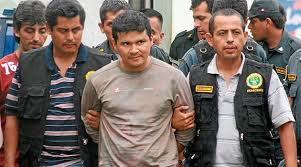

Pedro Pablo Nakada Ludeña was born on February 28, 1973 in Lima, Peru. He was reportedly abused by his family from a young age. His sister's would have him dress up as woman and his father was an alcoholic who would abuse his mother. He was also raped by his brothers after they thought that he had killed a dog. Ludeña claimed to have tortured animals as a child. Ludeña killed his victims with 9mm pistols that were equipped with rubber silencers that he had made from slippers. He claimed of wishing to cleanse the Earth by eliminating drug addicts, prostitutes, homosexuals, and criminals after being commanded by God to do so.
Authorities from the homicide divisions of the Peruvian National Police in Lima and Huaral arrested Pedro Pablo Nakada Ludeña 33, prime suspect of the murders of more than 13 people in the northern provincial city of Huaral. Dubbed the "Apostle of death," Ludeña was arrested along with Christian Garcia Ponzino 26, after resisting arrest during a shootout with police authorities. While in custody, Ludeña confessed to the murders and told police he killed people who deserved to die. He added that he was ridding society of what he considered to be bad seeds. Garcia, who maintains his innocence, and Ludeña worked together at a mechanic's shop in Huaral. He was convicted of 17 murders and confessed to killing 25. He was sentenced to the maximum of 35 years in prison.