



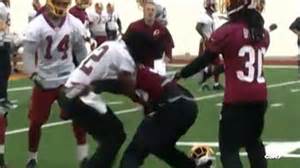

Redskins cornerback Bashaud Breeland and receiver Andre Roberts exchanged punches during the individual portion of practice, adding yet another layer of drama to the team's season. Breeland and Roberts were involved in a play in which the rookie corner broke up a pass to Roberts. It appeared as they fell to the ground that Roberts accidentally kneed Breeland in the groin. As Breeland stood up, he grabbed his groin, walked a few steps and bent over; Roberts' back was turned at the time. A minute or so later, close to the line of scrimmage, Roberts and Breeland exchanged words. Roberts slammed his helmet to the ground and threw a punch immediately before Breeland, who hitched up his pants right before the punch, threw one of his own. Breeland then tried to tackle Roberts. Neither player was wearing his helmet.
The scuffle was broken up by a handful of players, including safety Ryan Clark, cornerback E.J. Biggers. Clark walked Roberts away, but then Roberts shoved him as well. Roberts and Breeland exchanged more words from about 10 yards apart. At that point, the practice became closed to the media; it is open for only 15 to 20 minutes, and the incident occurred near the end of the session. Both Roberts and Breeland declined comment. Roberts, however, addressed the incident in a tweet later Wednesday.